
A trading algorithm has a defined set of instructions which needs to be executed in predetermined order. The profit generating capability might differ from one algorithm to another but widely all algos benefits from a faster execution. A python code can be developed to execute these set of instructions efficiently.
Let’s look on how to develop a python program to execute an algorithm. Generally, any trading algo will have three basic steps:
- Fetch different variables like timing, price, quantity, volume.
- Run a mathematical model like calculating candles, options greeks, etc.
- Place appropriate trades if required (defined conditions are met)
We developed a module ‘Algo Module’ to execute all the above steps.
Algo Module

The Algo Module contains three functional classes, data_guy, events_and_actions and trader, one for each function.
Data_guy
Data_guy is a class whose objects will be responsible for fetching all required variables. It will periodically fetch, calculate and store variables which will be used by the algo.
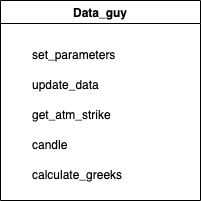
Data_guy has following functionality:
set_parameters
A function to set various parameters of the class object.
update_data
This function fetches the latest data like last traded price, updated profit or loss, candle values etc. It also stores all the data which can be used for further calculation or logic.
get_atm_strike
This is a function to calculate strike of an option which is closest to the current traded price, this strike can be considered as at the money strike.
candle
This function calculates candles based on the candle length provided. It has flexibility to calculate candle of any length and for any historical time period.
calculate_greeks
This function is used to calculate options greeks. It can be used to calculate delta, gamma, rho, vega and theta of multiple options in single run.
Events_and_actions
Events_and_actions is the core strategy. The whole strategy is designed across multiple events and all events are mapped to an action. Events are designed to have multiple conditions, if all the conditions related to event are satisfied corresponding action is triggered. For e.g. if event_total_loss_reached is satisfied then action_close_the_day will be triggered.
If one event is satisfied during a iteration no other event will be checked, thus the events should be prioritized.
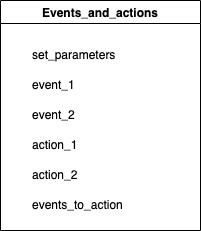
Events_and_actions have following functionality:
set_parameters
A function to set various parameters of the class object.
Events – event_1, event_2
These functions represents different events which needs to be monitored during the execution.
Actions – actions_1, actions_2
These functions perform different actions, like execute trade, square off existing trades. Action populate the orderbook with orders that needs to be carried out. It then call trader to execute those trades. Actions are mapped to different events and are executed only when its corresponding event is satisfied.
events_to_action
This function checks for all events one by one to see if its required conditions are met. If and event is satisfied the corresponding action is triggered.
Trader
Trader’s objects will be responsible to communicate with broker and carry out trades.
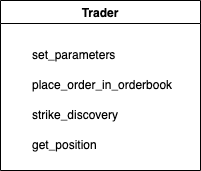
Trader have following functionality:
set_parameters
A function to set various parameters of the class object.
place_order_in_orderbook
This function iterates over all orders in the orderbook and places them to broker one by one.
strike_discovery
The function takes in price or delta as input and returns strike of option which is the closest match. It scans through multiple options and calculate their greeks and finally return the best matched strike.
get_positions
The function is used to get current position of the day.
Algo_manager
Algo_manager class is designed to initiate and set parameters all objects: data_guy, events_and_actions, trader. This class’ functionality is to manage above classes.

Algo_manager has just one functionality – to initiate and run the algo
action
Action function is meant to kick off every iteration for the algo. It triggers update data and then check for all events.
The Algo Trader is a WIP project, to access source code please check it out on github.

 Hitesh Gulati, CFA